Showing posts with label Computer Vision. Show all posts

Object Tracking

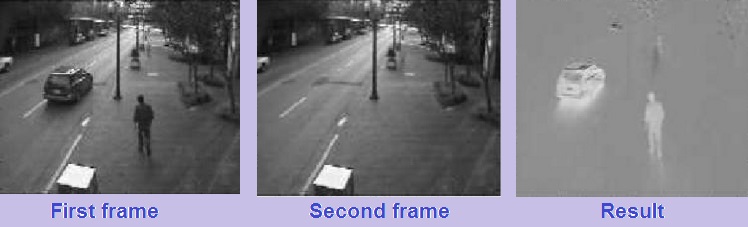
Object tracking is the tracking of a moving object. It is essential for image based AI tasks. In computer vision a video stream from a camera is used to track the moving object.These moving objects can be anything, it may be a hand of person or a vehicle or it may be a fighter jet aircraft.

Traditional Methods

Various methods are used to track objects.

1) Absolute Difference 

It is the most simple and old method to track an object. In this method the  incoming video frame is subtracted from the one before. Mathematically,
I (c) = I ( i ) - I ( j )
Ideally, I ( c ) = 0, when there is no change in consecutive frames.


This can be easily performed in opencv using a class known as BackgroundSubtractor. Find more information about background subtractor here @ Opencv docs.

2) Census Transform  

In census transform a signature vector is generated for an object To understand this lets have an example.
Lets suppose we have a 3x3 mask which is convolving with the image, such that it assign binary value to each pixal. This value is 1, if the pixel value is greater than the center value of the mask and 0 if its less than the center value. This way it generates a signature vector for each pixel, i.e 11011101. This process can be seen in figure below.
A list of signature vector is generated for each frame. Then the signature vector of the predecessor frame is compared with the successor frame.

Deep Learning Methods

Various deep learning based methods are currently used to track objects due to their improved performance. These include, 
1. YOLOv8 (You Only Look Once - Version 8) and other varients.
2. DETR (DEtection TRansformer)
3. EfficientDet
4. FocalNet
5. CenterNet
6. Sparse R-CNN

OpenCV

OpenCV Logo
OpenCV is an open source C++ and python library for image processing and computer vision, developed by Intel. It was officially launched in 1999. It supports multi core processing, OpenCV was designed for computational efficiency and with a strong focus on real-time applications. 


The OpenCV library has more than 2500 optimized algorithms with thousands of functions. These functions can be used to detect, track classify and recognize different objects like human face, vehicles etc. In addition to these core functionalities, OpenCV  also contains other modules like machine learning algorithms that can analyze and predict visual patterns and the HighGUI module provides user interface elements as well as functions for storing and accessing video and image files.


OpenCV is very easily interfaced with other programs. It can be used on many operating systems like Microsoft Windows, Ubuntu and Mac.

Companies like Google, Sony, Toyota, nVIDIA and Intel are using these libraries for their own projects like,

1)   Automated surveillance and inspection 
2)   Street view image stitching 
3)   Robot and driver-less car navigation and control 
4)   Medical image analysis (Brain MRI) 
5)   Video/image search and retrieval 
6)   Movies - 3D structure from motion 
7)   Security Projects

Different version of OpenCV are available and are free to download from Here.

Viola-Jones Algorithm | Computer Vision

Viola-Jones Algorithm | Explained

Vila-Jones algorithm is widely used in Computer Vision for facial feature extraction. It can also be used for detecting other objects.  

Viola-Jones algorithm is a combination of the following techniques

1)   Haar like Features     
2)   Integral image     3)   Adaboost     4)   Cascading

Haar Features

Haar features are digital image features used in object recognition. Each feature result in a single value, calculated by subtracting the sum of pixel under white region from black region as shown in figure below. There are a lot of features eg in case of face there can be upto 150,000 features of different shapes.

Haar features in viola jones algorithm


Haar features


Integeral Image

In integral image the value of pixel (x,y) is sum of pixels above and to left of pixel(x,y). Example can be seen in the figure below. 
Integral image in viola jones
Integeral Image


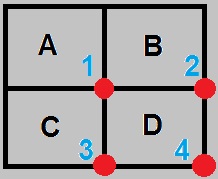
To increase the computation speed we sum up only the corner pixels. Lets have an example. Suppose we have an image as shown below. If you add values of the diagonal pixels and subtract it from the summation of the other diagonal pixels then you have the sum of all the pixels, Mathematically 
  D    =    ( 1 + 4 )  -  ( 2 + 3 )
                        =   A+(A+B+C+D)-(A+C+A+B)
 =   D                      

integral image in viola jones

AdaBoost

AdaBoost is a machine learning algorithm for finding best features from the list of available features. The use of Adaboost decrease computation and hence increase speed.
In Adaboost there are two types of classifiers, i.e Strong classifier and week classifier. Weak classifier is one which detect more than 50% faces. A number of week classifier makes strong classifier. The weak Classifier output is 0 or 1.

Mathematically it can be represented as,

F(x)   =   a1*f1(x)   +    a2*f2(x)   +   a3*f3(x)..... 

Strong Classifier                                    Weak Classifier

Cascading

After adaboosting the features are reduced to 25000 features, but still it requires a lot of computations. So we reduce it by cascading. A Cascade consist of stages, each consist of strong classifier. An image is declared as a non Eyes if any of the classifier return 0.

Cascading in viola jones

 How can I apply this in Matlab??

_________________________________________________________________________________
Example
 image = imread("yourimage.jpg");
 faceDetector = vision.CascadeObjectDetector; % Load calssifier
 bboxes = step(faceDetector, Img);
 figure, imshow(Img), title('Detected faces');hold on
 for i=1:size(bboxes,1)      rectangle('Position',bboxes(i,:),'LineWidth',2,'EdgeColor','y');
 end
 end
_________________________________________________________________________________

 Is there any way to do it in OpenCV??

Yes here is an example.
_________________________________________________________________________________
Example
#include<opencv\cv.h>
#include<opencv\highgui.h>
#include<opencv2\objdetect\objdetect.hpp>
#include<vector>
using namespace cv;
using namespace std;
int main()
{
 CascadeClassifier face_cascade;
 if(!face_cascade.load("C:\\opencv\\sources\\data\\haarcascades\\haarcascade_frontalface_default.xml")) 
    { printf("Error loading cascade file for face"); return 1; }
 VideoCapture capture(0); //-1, 0, 1 device id
 if(!capture.isOpened())
    { printf("error to initialize camera");return 1; }
 Mat cap_img,gray_img;
 vector<Rect> faces;
 while(1)
 {
  capture >> cap_img;
  cvtColor(cap_img, gray_img, CV_BGR2GRAY);
 face_cascade.detectMultiScale(gray_img,faces,1.7,3,CV_HAAR_SCALE_IMAGE|CV_HAAR_DO_CANNY_PRUNING,cvSize(0,0), cvSize(300,300));
  for(int i=0; i < faces.size();i++)
   {
     Point pt1(faces[i].x+faces[i].width, faces[i].y+faces[i].height);
     Point pt2(faces[i].x,faces[i].y);
     Mat faceROI = gray_img(faces[i]);
     rectangle(cap_img, pt1, pt2, cvScalar(0,255,0), 2, 8, 0);
   }
  imshow("Result", cap_img);
  if(waitKey(30) >= 0) break;
 }
 return 0;
}
_________________________________________________________________________________

Future of Computer Vision


What if you can control you PC with a gaze of your eyes and hands or you just move your hand in the air and your television switches to your favorite channel. Or you just point out your camera to
an unknown thing and your cell phone tells you what exactly it is. Or what if your car takes you to your office without a driver.

     Yes it’s possible.


That’s what computer vision all about is.

Today computer vision is one of fast growing area in the field of technology. Many sophisticated programming tools like OpenCV have been developed A lot of research is going on to improve computational speed and accuracy of the algorithms..

 Computer Vision have proved it’s application in
• Medical Sciences
• Security Systems
• Machine learning
• Graphics
• Computational photography
• Daily life gadgets.

Many applications are now a days very common. For example face detection and smile detection in the cameras.


Perhaps someday Google may introduce a new service you don’t have to enter a password for your Gmail account your camera will recognize you. Or an Apple phone may be unlocked by simply looking at it.

With the development of Computer Vision we are enhancing our systems with the sense of vision. In future we will have the word where robots will see you, recognize you and they will interact with you as if they are humans.

Someone said once
One Picture is worth more than ten thousand words.
And Computer Vision is surely proving this.

                                                                                                     Regards

                                                                                                     Team@”CV Manic”

What is an Image in Computer Vision

Image is a two dimensional array of pixels, i.e.
Where each pixel represent the intensity. Pixels are represented by numbers. Each number represent a color. 0 Represent black while 255 represent white. This type of image is 8bit image. I.e. 0=00000000, and max value 255=11111111. Another type of image is 16 bit image, which ranges from 0 to 65535.
Types  :
  1. Gray Scale Image 
  2. RGB Image

Gray Scale Image

The image in which the colors are only shades of gray are known as gray scale image(Black and white). Example of grey scale image is.

RGB Image 

Another type of image is RGB image. An RGB image is the combination of Red, Green and Blue image

Red Green Blue of image

The Difference between these two types of images is that the Gray scale image is a single 2-dimensional matrix while RGB image is a combination of three 2-dimensional matrices.
An RGB image can be converted to gray using the following methods,

                        ->  Average Method
                            R + G + B 
Gray image    =   ------------------
                            3
                        ->  Approximate Method

                   Gray image   =  0.59*R + 0.30*G + 0.11*B

Binary Image

A binary image is a digital image that has only two possible values for each pixel 0 or 1 (Black, white). For binary image a threshold value is set. Below threshold the output is 0 while above threshold value is 1. A binary image looks like this.


How can I read image in Matlab??

To read image in matlab use imread() cammand. Use imshow() to display image.
_________________________________________________________________________________
Example
image=imread('image name.jpg');
imshow(image)

_________________________________________________________________________________
How can I read image in OpenCV??

Lets have an example.
_________________________________________________________________________________
Example
#include<stdio.h>
#include<opencv\cv.h>
#include<opencv\highgui.h>
using namespace cv;
using namespace std;
int main()
{
  Mat cap_img;   // define image matrices
  Mat img=imread("C:\\yourimage.JPG",CV_LOAD_IMAGE_UNCHANGED);
  imshow("image window",img);
  while(1)    
   {
     if(waitKey(10) >= 0) break; // press escape to exit program
   }
}
_________________________________________________________________________________


How can I convert RGB to Gray in Matlab??

To convert image from RGB to Gray use this  rgb2gray() command.
_________________________________________________________________________________
Example
image=imread('image name.jpg');
grayimage=rgb2gray(image);
imshow(grayimage)
_________________________________________________________________________________

How can I convert image to gray scale in OpenCV??

Lets have an example.
_________________________________________________________________________________
Example
#include<stdio.h>
#include<opencv\cv.h>
#include<opencv\highgui.h>
using namespace cv;
using namespace std;
int main()
{
  Mat img;   // define image matrices
  Mat gray_image;
  img=imread("C:\\yourimage.JPG",CV_LOAD_IMAGE_UNCHANGED);
  cvtColor(img, gray_image, CV_BGR2GRAY);// convert to Grayscale 
  imshow("image window",img);
  imshow("Gray scale image",gray_image);
  while(1)    
   {
     if(waitKey(10) >= 0) break; // press escape to exit program
   }
}
_________________________________________________________________________________

How can I convert RGB to binary in Matlab??

To convert image to binary, use im2bw() command,
_________________________________________________________________________________
Example
Image = imread('image');
binimg = im2bw(Image,0.4);
imshow(binimg)
_________________________________________________________________________________

Hough Transform


Hough Transform is Feature extraction technique used to detect different mathematical shapes, including lines, circles, parabolas, ellipses and some irregular shapes.

Lets have few examples of hough transfom so you may understand it.

Hough Transform for lines

A line in the image space can be expressed with two variables in different systems i.e.

Cartesian Coordinate system :    y  =  mx + b                   -----(1)
Polar Coordinate system        :    r  =  x cos∅ + y sin∅     -----(2)

Now lets come to the theory,
lets draw a line as shown in figure a in Cartesian coordinate system. This line contain four points.

Hough Transform


  • Let's take the first point(blue), find the values of x and y for this point. Put these values in polar coordinates equation (2).
  • Draw a line in polar coordinates plane for the values of x and y and varying ∅, as shown in figure b (blue line). 
  • Repeat these steps for other three lines. 
  • Now if these points belong to a same line, they will meet a common point in polar coordinates. The more number of points the line have the more will be lines intersecting at the common points. 
  • The next step is to set a threshold. This threshold is imposed on the number of lines passing from the common point. This will set a min length of the line which are going to be detected. 

 Is There any function for this in MATLAB ??


Yes, There is a function known as Houghlines(), Here is an example for you.
_________________________________________________________________________________
Example

 img = imread('yourimage.jpg');
 grayimg = rgb2gray(img);
 edg = edge(grayimg,'canny'); % Edge detection is necessary before  hough transform
 imshow(edg)
 [H,theta,rho] = hough(edg);
 P = houghpeaks(H,5,'threshold',ceil(0.3*max(H(:))));
 lines = houghlines(edg,theta,rho,P,'FillGap',5,'MinLength',7);
 imshow(grayimg), hold on
 max_len = 0;
 for k = 1:length(lines)
   xy = [lines(k).point1; lines(k).point2];
   plot(xy(:,1),xy(:,2),'LineWidth',2,'Color','green');
   % Plot beginnings and ends of lines
   plot(xy(1,1),xy(1,2),'x','LineWidth',2,'Color','yellow');
   plot(xy(2,1),xy(2,2),'x','LineWidth',2,'Color','red');
   % Determine the endpoints of the longest line segment
   len = norm(lines(k).point1 - lines(k).point2);
   if ( len > max_len)
     max_len = len;
     xy_long = xy;
   end
 end


_________________________________________________________________________________


Hough Transform for cicles

Hough transform for circle is quite similar to that of line.
Lets suppose we have a circle in cartesian plane with some radius r, as shown in figure below

Hough Transform
  • Now consider that there are 4 points on the circle. Draw new circles of same radius on these points as shown in the second figure in red color. 
  • You will see that these circles will intersect at a common point, which shows that these point belongs to the same circle. 
  • The next step is to set a threshold. This threshold is imposed on the number of circles passing from the common point. This will set a min points required for a shape to be declared as a circle. 

How can I do it in MATLAB ??


It's very easy in Matlab. You can use imfindcircles(). Here is the code
_________________________________________________________________________________
Example

img=imread('yourimage.jpg');
a=rgb2gray(img);
Rmin=2;
Rmax=25;
[centers,radii,metric]=imfindcircles(a,[Rmin,Rmax],'ObjectPolarity','dark','Sensitivity',0.895);
imshow(img);
viscircles(centers, radii,'LineStyle','--');

_________________________________________________________________________________

How to Detect Edges (in Image processing)


Edge detection is an image processing technique that is used for finding the boundaries of objects within images. The points at which image brightness changes sharply are declared as edges.


Edge detection
1


Edge detection
1
The three most common methods for edge detection are
  • Sobel 
  • Canny 
  • Prewitt 


Sobel Operator
Sobel operator perform a 2-D spatial gradient measurement on an image.
                   Mathematically,
The operator uses two 3×3 kernels which are convolved with the original image. Note that different masks are used for vertical and horizontal edges.
Sobel Edge Detection


Is there any way to do it in Matlab??

Yes you can use "edge()" function in matlab for sobol edge detection. You can also use this function for canny and prewitt operator.
_________________________________________________________________________________
Example
Image = imread('yourimage.jpg');
edg = edge(Image,method,threshold);
imshow(edg);
_________________________________________________________________________________
_________________________________________________________________________________


Canny Operator
Canny Operator uses a multi-stage algorithm to detect a wide range of edges in images. The Canny edge detection algorithm can be broken down into 5 steps:
  • Apply Gaussian filter to smooth the image in order to remove the noise 
  • Next step is to find the intensity gradients of the image 
  • Then apply non-maximum suppression to get rid of spurious response to edge detection 
  • Apply double threshold to determine potential edges 
  • Finalize the detection of edges by suppressing all the other edges that are weak and not connected to strong edges.

    Canny Edge Detection

How can i do it in OpenCV??

____________________________________________________________________________
Example
#include<stdio.h>
#include<opencv\cv.h>
#include<opencv\highgui.h>
#include<iostream>
using namespace cv;
using namespace std;
int main()
{
VideoCapture capture(0); // capture video
if(!capture.isOpened())
{printf("error to initialize camera");  return 1; }
Mat cap_img,gray_img; // define image matrices
 Mat detected_edges;
while(1)
{
capture >> cap_img;  // capture frame from cam
cvtColor(cap_img, gray_img, CV_BGR2GRAY); // convert to Grayscale
Canny( gray_img, detected_edges, 20, 60, 3 );      // Apply canny edges
                imshow("video", cap_img);                     // show RGB image
imshow("Edges", detected_edges);               // show Detected edges

                if(waitKey(10) >= 0) break;                  // press escape to exit program
}
return 0;
}
_________________________________________________________________________________

Prewitt Operator
The Prewitt operator is based on the convolution of image with a small, separable, and integer valued filter in horizontal and vertical directions. This operator also require less computations. The mask used for this purpose is as follow


Prewitt Edge Detection

.